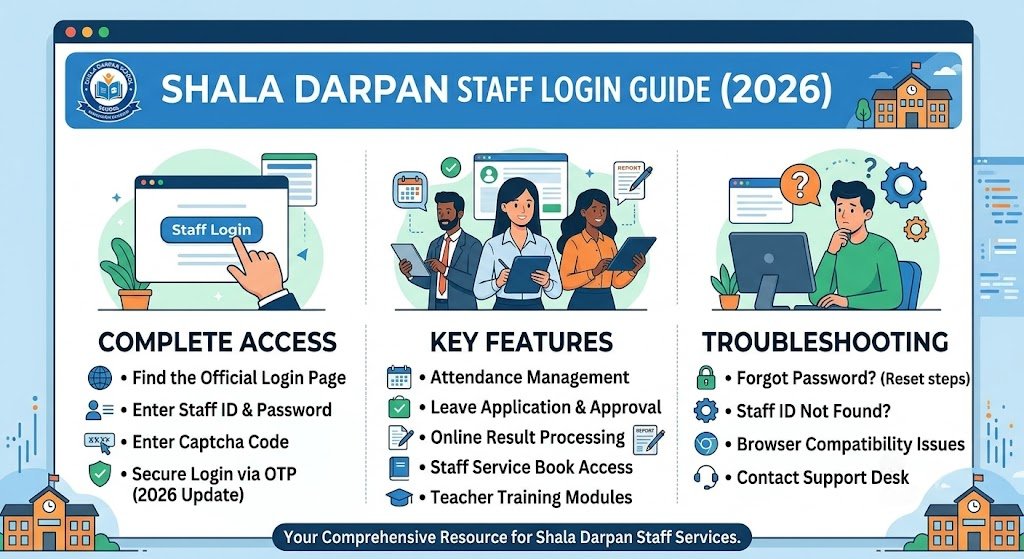
The Shala Darpan staff login system is an essential digital gateway for teachers, school staff, and education department employees in Rajasthan. It streamlines school administration, employee management, student records, and communication between staff and the education department.
Developed as part of the Rajasthan government’s digital education initiative, the platform reduces paperwork, improves transparency, and ensures faster decision-making in school governance.
In this detailed guide, you will learn how to access the Shala Darpan staff portal, troubleshoot login issues, reset passwords, and understand its key features and benefits. Whether you are a new user or an experienced staff member, this guide will help you use the portal more efficiently.
What is Shala Darpan Staff Login?
The Shala Darpan Staff Login is the official authentication system used to access the staff dashboard of the Shala Darpan portal.
Shala Darpan is a centralized digital platform launched by the Government of Rajasthan to manage school education data, employee records, and administrative workflows.
Through the staff login, authorized users such as:
- Teachers
- Principals
- Block Education Officers
- Administrative staff
- Department officials
can securely access their dashboard and perform tasks such as updating records, viewing transfers, managing service details, and accessing school-related information.
Key Features of Shala Darpan Staff Login
The Shala Darpan portal is designed to simplify educational administration. Once logged in, staff members can access several powerful features:
1. Employee Dashboard
- View personal service details
- Check job status and postings
- Access transfer history
2. School Management System
- Monitor school performance data
- View student enrollment statistics
- Access academic reports
3. Service Record Management
- Update personal information
- Track promotions and transfers
- Maintain service history digitally
4. Leave & Attendance Tracking
- Apply for leave online
- View attendance records
- Monitor approval status
5. Communication System
- Receive official notifications
- Communicate with education authorities
- Access circulars and updates
6. Transparency in Administration
- Real-time updates of staff data
- Reduced paperwork and manual errors
- Centralized data management
How to Access Shala Darpan Staff Login (Step-by-Step Guide)
If you are trying to log in for the first time, follow these simple steps:
Step 1: Visit the Official Portal
Open your browser and go to the official Shala Darpan website.
Step 2: Click on Staff Login
On the homepage, locate the “Staff Login” option and click on it.
Step 3: Enter Login Credentials
You will need:
- Staff Username / ID
- Password
- Captcha code (if displayed)
Step 4: Verify Details
Double-check your credentials before submitting to avoid errors.
Step 5: Access Dashboard
Once logged in successfully, you will be redirected to your personal staff dashboard.
How to Reset Shala Darpan Staff Login Password
Forgetting passwords is common. The portal provides a simple recovery process.
Step 1: Click on “Forgot Password”
On the login page, select the password recovery option.
Step 2: Enter Registered Details
Provide:
- Staff ID
- Registered mobile number or email
Step 3: OTP Verification
You will receive a One-Time Password (OTP) on your registered mobile.
Step 4: Create New Password
Enter a strong new password and confirm it.
Step 5: Login Again
Use your new credentials to access the portal.
Common Shala Darpan Staff Login Issues & Fixes
Many users face login problems due to small technical or input errors. Here are the most common issues and solutions:
1. Incorrect Password Error
Cause: Wrong password entry
Fix: Use “Forgot Password” option to reset credentials
2. Server Not Responding
Cause: High traffic or maintenance
Fix: Try again after some time or during off-peak hours
3. Captcha Not Working
Cause: Browser cache issues
Fix: Clear cache or switch browser
4. Account Locked
Cause: Multiple failed login attempts
Fix: Contact school administration or IT support
5. Slow Portal Loading
Cause: Weak internet connection
Fix: Use stable broadband or mobile data
Benefits of Shala Darpan Staff Login for Teachers and Employees
The Shala Darpan system offers several long-term benefits for education staff:
1. Time-Saving System
No need for manual paperwork—everything is digital.
2. Easy Access to Records
Staff can instantly view service history, postings, and updates.
3. Transparency in Transfers
Transfer orders and updates are clearly visible on the portal.
4. Better Communication
Teachers receive official notifications directly through the system.
5. Reduced Administrative Burden
Schools can focus more on education rather than paperwork.
6. Secure Data Handling
All data is stored securely with restricted access control.
Mobile Access to Shala Darpan Staff Login
The platform is also accessible via mobile browsers, making it convenient for users on the go.
Tips for Mobile Users:
- Use Chrome or Firefox for better compatibility
- Ensure stable internet connection
- Avoid using outdated browsers
- Bookmark the login page for quick access
Although there is no dedicated official mobile app for staff login in some regions, the web version is fully responsive and mobile-friendly.
Security Best Practices for Staff Login
Since the portal contains sensitive employee data, following security practices is essential:
Do:
- Use strong passwords
- Change passwords regularly
- Log out after each session
- Use official website only
Don’t:
- Share login credentials with others
- Use public Wi-Fi for login
- Save passwords on shared devices
- Ignore security alerts
These precautions help protect your personal and professional data.
Importance of Shala Darpan in Rajasthan Education System
The digital transformation of education in Rajasthan has been significantly supported by Shala Darpan. It ensures:
- Efficient school administration
- Transparent employee management
- Real-time data access
- Improved decision-making
By integrating technology into education governance, the system has modernized how schools operate across the state.
Conclusion
The Shala Darpan staff login system is a powerful digital tool that has transformed the way school administration works in Rajasthan. From managing employee records to improving transparency in education governance, it plays a crucial role in modernizing the education system.
By understanding how to log in, troubleshoot issues, and use its features effectively, teachers and staff can significantly improve their productivity and reduce administrative workload.
As digital education systems continue to evolve, platforms like Shala Darpan will remain at the center of efficient and transparent school management in India.
Frequently Asked Questions (FAQs)
1. What is Shala Darpan staff login used for?
It is used by teachers and staff to access service records, school data, and administrative tools.
2. Who can use the Shala Darpan staff login?
Only registered government school employees and education department staff can use it.
3. What should I do if I forget my password?
Use the “Forgot Password” option on the login page to reset it using OTP verification.
4. Why is my Shala Darpan login not working?
It may be due to incorrect credentials, server issues, or browser problems.
5. Can I access Shala Darpan on mobile?
Yes, the portal is mobile-friendly and can be accessed via any modern browser.
6. Is Shala Darpan safe to use?
Yes, it is a secure government platform with controlled access and encrypted data.