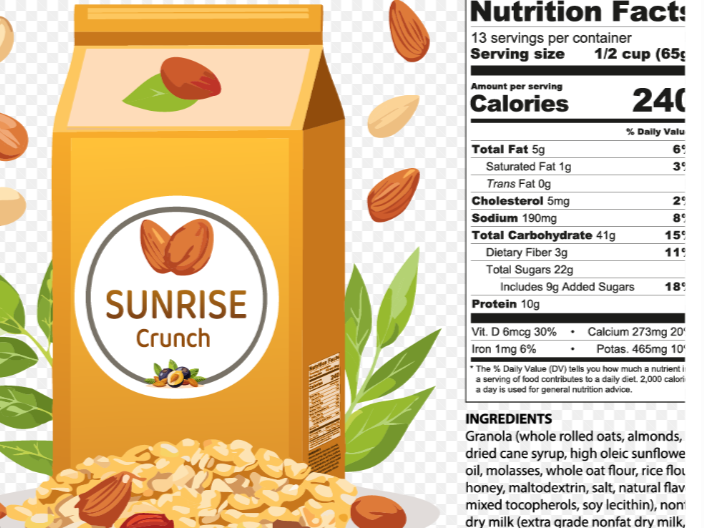
If you are looking for a nutrition facts label template free of charge, you may want an easy way to create professional-looking nutrition labels for homemade products, recipes, meal-prep foods, or small food businesses. A well-designed nutrition label makes it easier to organize nutritional information and present it clearly.
A nutrition facts label typically includes information such as serving size, calories, total fat, carbohydrates, protein, sodium, and other nutrients. Depending on where and how you plan to sell or distribute a food product, additional labeling requirements may apply.
The good news is that you do not always need expensive design software to create a basic nutrition facts label. A free template can provide a useful starting point and help you organize the information consistently.
In this guide, we will explain what a nutrition facts label template is, what information it usually contains, how to create one, and how to use a free template effectively.
What Is a Nutrition Facts Label Template?
A nutrition facts label template is a pre-designed layout that provides spaces for nutritional information about a food product.
Instead of designing a label from scratch, you can use a template and enter the information for your particular recipe or product.
A typical template may include:
- Serving size
- Servings per container
- Calories
- Total fat
- Saturated fat
- Trans fat
- Cholesterol
- Sodium
- Total carbohydrates
- Dietary fiber
- Total sugars
- Added sugars
- Protein
- Selected vitamins and minerals
The exact information required can vary depending on the country, product, packaging, and intended use.
Why Use a Free Nutrition Facts Label Template?
Creating a nutrition label from a blank page can take time. A template gives you a structured starting point.
1. Saves time
A template already provides the basic structure, so you can focus on entering and checking your nutritional information.
2. Keeps information organized
Nutrition information can contain many numbers and categories. A consistent layout makes the information easier to read.
3. Useful for recipes
Food bloggers, recipe creators, and home cooks can use templates to organize nutritional information for individual recipes.
4. Helpful for small food businesses
Small producers may use templates as part of their label-development workflow, although regulatory requirements should always be checked before commercial use.
5. Easy to customize
A template can often be adapted to different recipes, serving sizes, and product types.
What Information Goes on a Nutrition Facts Label?
Before using a nutrition facts label template free, it is important to understand the information that goes into it.
Serving Size
Serving size tells the consumer how much food the nutrition information represents.
For example, a label might specify a serving as a certain number of grams, pieces, or another appropriate household measure.
Serving size is important because the calories and nutrient values listed on the label are generally based on that serving.
Servings Per Container
This indicates approximately how many servings are contained in the package.
For example, a package might contain multiple servings even if a person could potentially consume the entire package at once.
Calories
Calories indicate the amount of energy provided by a serving.
When creating a nutrition label, calorie information should be calculated or obtained from a reliable nutrition-analysis source.
Total Fat
Total fat represents the amount of fat in one serving.
The label may also provide additional information about saturated fat and trans fat.
Cholesterol
Cholesterol information may be included depending on the applicable labeling requirements.
Sodium
Sodium is typically listed in milligrams and is an important part of many nutrition labels.
Total Carbohydrate
Total carbohydrate can include dietary fiber, sugars, and other carbohydrates.
Dietary Fiber
Dietary fiber is listed separately from total carbohydrate on many nutrition labels.
Total Sugars and Added Sugars
Modern nutrition labeling may distinguish between total sugars and added sugars.
This distinction can help consumers understand the difference between sugars naturally present in ingredients and sugars added during processing or preparation.
Protein
Protein is generally listed in grams per serving.
Vitamins and Minerals
Depending on the applicable regulations, certain vitamins and minerals may appear on the label.
How to Create a Nutrition Facts Label Using a Free Template
Creating a label does not have to be complicated. The process can be broken into several steps.
Step 1: Gather your recipe ingredients
Start with the complete recipe or product formula.
Write down every ingredient and the amount used. Be as precise as possible because changing ingredient quantities can change the nutritional values.
Step 2: Determine the finished yield
Determine how much food the complete recipe produces.
For example, if a recipe produces 12 cookies, the nutrition information needs to be calculated based on the appropriate serving size.
The final yield can affect the nutritional value per serving.
Step 3: Choose a serving size
Decide how much food represents one serving.
The serving size should make sense for the product and should be consistent with any applicable labeling requirements.
Step 4: Calculate nutrition information
Use reliable nutrition data or an appropriate nutrition-analysis tool to determine the nutritional content of the recipe.
Do not simply guess the numbers.
Small differences in ingredients, brands, preparation methods, and serving sizes can affect the final nutritional values.
Step 5: Enter the information into your template
Once you have the nutritional information, enter the values into your free template.
Double-check every number before using the finished label.
Step 6: Review the label
Check the label carefully for:
- Spelling
- Serving size
- Calories
- Nutrient amounts
- Ingredient information
- Formatting
- Units
- Required declarations
A second review can help catch simple errors.
Step 7: Export or print
Once the label is complete, you can save it in an appropriate format for your project.
For personal use, a basic printable label may be sufficient. For commercial packaging, make sure the final label meets the applicable regulatory and packaging requirements before printing large quantities.
Free Nutrition Facts Label Template Ideas
When searching for a nutrition facts label template free, you may find templates in several formats.
Printable Templates
Printable templates can be useful when you want to create physical labels for recipes, meal-prep containers, or educational projects.
Word Templates
A document-based template can be convenient if you want to edit text and organize information using familiar software.
Spreadsheet Templates
Spreadsheet-based templates can be useful when working with multiple products or recipes because nutritional information can be organized in rows and columns.
Design Templates
Graphic design templates may provide more control over the appearance of the finished label.
However, visual design should not come at the expense of accuracy or readability.
Nutrition Facts Label Template for Homemade Products
If you make food at home, a template can help you present nutritional information in an organized way.
For example, you might create a label for:
- Homemade cookies
- Granola
- Bread
- Cakes
- Sauces
- Jams
- Snack mixes
- Protein bars
- Meal-prep foods
- Baked goods
For personal use, the label can simply help you keep track of nutritional information.
If you plan to sell a homemade food product, however, requirements can be more complicated. Regulations may depend on your location, the type of food, where it is sold, and how it is packaged.
Nutrition Facts Label Template for Small Food Businesses
A free template can be useful during product development for a small food business.
For example, a business might create multiple versions of a product label while testing recipes.
A template makes it easier to maintain consistent formatting between products.
However, a free template is not automatically a guarantee that a label is legally compliant.
Before selling packaged food, check the rules that apply to your market. In the United States, nutrition labeling is regulated by the U.S. Food and Drug Administration, while other countries have their own food-labeling authorities and requirements.
Common Mistakes When Creating Nutrition Labels
Even with a template, mistakes can happen.
Using inaccurate ingredient amounts
If the ingredient quantities are incorrect, the nutrition calculation can also be incorrect.
Forgetting serving size
A nutrition label without a clearly defined serving size can be confusing.
Using outdated nutrition information
Ingredient formulations and nutrition databases can change. Use appropriate and reliable information for your calculations.
Confusing the whole recipe with one serving
If your recipe makes multiple servings, the nutrition values need to be calculated appropriately for the selected serving size.
Assuming a template guarantees compliance
A template provides formatting assistance. It does not automatically make a label compliant with every applicable law.
Poor readability
Tiny text, crowded layouts, or unclear sections can make a label difficult to use.
How to Make Your Nutrition Label Easy to Read
A good nutrition label should prioritize clarity.
Use a simple layout and consistent typography. Avoid unnecessary graphics that distract from the nutritional information.
Make sure numbers and units are easy to distinguish.
Keep related information together and provide enough spacing between sections.
If the label will be printed at a small size, test a physical copy before producing a large batch.
Can You Make a Nutrition Facts Label in Canva or Word?
You can use common design and document software to create a visual layout, depending on your needs.
However, the important part is not simply making the label look professional. The nutritional information must be accurate, and the finished label must meet any applicable requirements.
A design program can help with appearance and formatting, but it does not automatically calculate correct nutrition values or guarantee regulatory compliance.
Free vs. Paid Nutrition Label Templates
A free template can be perfectly useful for simple projects, recipe documentation, and early product development.
Paid tools may offer additional features such as automated nutrient calculations, database access, multiple label formats, or specialized compliance support.
The right option depends on how frequently you create labels and what level of functionality you need.
For someone creating occasional recipe labels, a simple free template may be enough. A business producing many packaged products may need more specialized software or professional assistance.
Tips for Creating Accurate Nutrition Labels
Accuracy should be the main priority.
Use precise ingredient measurements whenever possible.
Keep track of the exact brands and varieties of ingredients used because nutritional values can differ between products.
Calculate the total recipe nutrition before dividing it according to the appropriate serving size.
Keep your calculations and ingredient records so you can update the label if the recipe changes.
If you are creating labels for commercial products, consider getting the finished label reviewed by someone familiar with the applicable food-labeling regulations.
Frequently Asked Questions
What is a nutrition facts label template?
A nutrition facts label template is a preformatted layout that helps you organize nutritional information such as serving size, calories, fat, carbohydrates, protein, sodium, and other nutrients.
Where can I find a nutrition facts label template free?
Free templates may be available from template websites, document software, design platforms, nutrition tools, and government or educational resources. Always check that the template is appropriate for your intended use and location.
Can I create a nutrition label for free?
Yes. You can create a basic nutrition label using free templates and commonly available document or design tools. However, accurate nutrition calculations and regulatory compliance may require additional resources.
Can I use a free nutrition label template for my business?
A free template can be used as a starting point, but you should verify that the final label complies with the food-labeling laws applicable to your product and market.
What should a nutrition facts label include?
Depending on the applicable regulations, it may include serving size, servings per container, calories, total fat, saturated fat, trans fat, cholesterol, sodium, carbohydrates, fiber, sugars, added sugars, protein, and selected vitamins and minerals.
How do I calculate nutrition information for a recipe?
Start with accurate ingredient quantities and reliable nutritional data. Calculate the nutrition for the complete recipe and then determine the appropriate amount per serving based on the final yield and serving size.
Can I make a nutrition label in Microsoft Word?
Yes. Word can be used to create a basic nutrition label layout. You will need to calculate the nutritional information separately and enter the results into the template.
Can I make a nutrition label in Canva?
A design platform such as Canva can be used to create the visual layout of a label. However, the software itself does not necessarily guarantee that the nutrition calculations or regulatory format are correct.
Does a free nutrition facts template guarantee FDA compliance?
No. A template is primarily a formatting tool. Compliance depends on the actual nutritional information, labeling format, ingredients, product category, claims, serving information, and other applicable requirements.
Should I use a nutrition label template for homemade food?
Yes, a template can be useful for organizing nutritional information for homemade foods. If the food is being sold commercially, make sure you understand the labeling rules that apply to your specific situation.
Can I customize a free nutrition facts label template?
Usually, yes. Depending on the template format, you may be able to change the text, serving information, nutrient values, dimensions, and other design elements.
What is the most important part of a nutrition label?
Accuracy and clarity are both important. Consumers need nutritional information that is presented clearly and based on appropriate calculations and labeling requirements.
Conclusion
A nutrition facts label template free can be a convenient starting point for creating organized nutrition labels for recipes, homemade foods, meal preparation, and product development.
The template itself is only one part of the process. Accurate ingredient measurements, reliable nutrition information, correct serving calculations, and a clear layout are all important when creating a useful label.
If you are preparing labels for commercial food products, remember that requirements vary by location and product type. Review the applicable regulations before using a label on packaging.
With the right template and accurate nutritional information, creating a clean and useful nutrition facts label can be much easier.
One thought on “Nutrition Facts Label Template Free: A Simple Guide to Creating Food Labels”